CERTIFICATE IN COMPUTER PACKAGES

Categories Certificate

About course

1. Course Overview

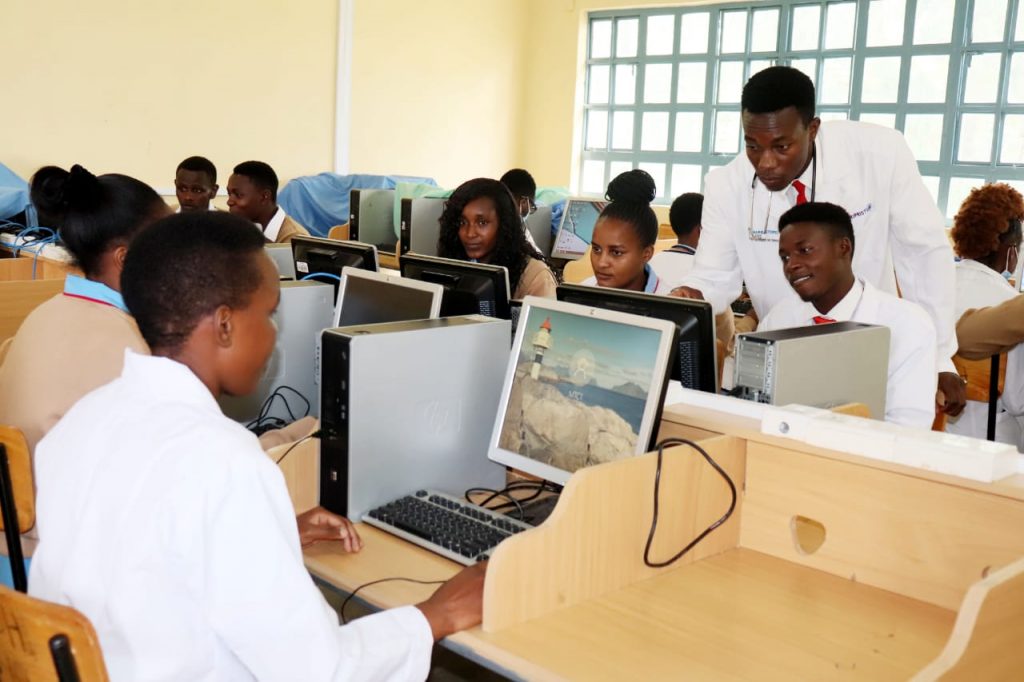
The Certificate in Computer Packages is a short, hands-on program designed to introduce learners to essential computer applications used in education, business, and healthcare environments.
It equips students with basic ICT literacy skills necessary for data entry, documentation, communication, and office operations.

2. Course Duration

Duration: 3 months (short course)
Mode of Study: Full-time / Part-time (theory and practical sessions)

3. Course Objectives

By the end of this course, trainees should be able to:

1. Understand the basic components and functions of a computer system.
2. Use key Microsoft Office applications for professional and academic tasks.
3. Apply internet and email tools for communication and research.
4. Manage files, folders, and data storage efficiently.
5. Apply computer knowledge in healthcare, business, and education settings.

4. Course Structure (Modules)

The course covers the following packages:

1. Introduction to Computers and Windows Operating System
Computer components and functions
Basic file and folder management
o Operating system navigation and shortcuts
2. Microsoft Word
o Creating, formatting, and editing documents
o Page setup, tables, and mail merge
o Printing and saving documents
3. Microsoft Excel
o Spreadsheet creation and formatting
o Formulas, functions, and data analysis
o Charts and report preparation
4. Microsoft PowerPoint
o Creating and designing presentations
o Applying animations and transitions
o Presentation techniques
5. Microsoft Access
o Introduction to databases
o Creating tables, queries, forms, and reports
o Managing records and data relationships
6. Microsoft Publisher (Optional)
o Designing flyers, newsletters, and brochures
7. Internet and Email Applications
o Browsing, searching, and downloading information
o Creating and managing email accounts
o Online safety and etiquette
8. Typing Skills and Practice
o Keyboard mastery and typing speed improvement
________________________________________
5. Teaching and Learning Methods
• Instructor-led demonstrations
• Hands-on computer lab practice
• Group exercises and assignments
• Real-life data entry and documentation projects
• Quizzes and short tests
________________________________________
6. Assessment Methods
• Continuous Practical Assessments
• Module-Based Tests
• Final Practical Examination
• Class Participation and Project Work
________________________________________
7. Career Opportunities
Graduates can work as:
• Data Entry Clerks
• Office Assistants
• Receptionists
• ICT Support Staff
• Administrative Assistants
Employment Areas:
• Hospitals and Clinics
• Schools and Colleges
• NGOs and Businesses
• Government Departments
• Self-Employment in ICT

  1. Course Overview

The Certificate in Computer Packages is a short, hands-on program designed to introduce learners to essential computer applications used in education, business, and healthcare environments.
It equips students with basic ICT literacy skills necessary for data entry, documentation, communication, and office operations.

  1. Course Duration
  • Duration: 3 months (short course)
  • Mode of Study: Full-time / Part-time (theory and practical sessions)
  1. Course Objectives

By the end of this course, trainees should be able to:

1. Understand the basic components and functions of a computer system.
2. Use key Microsoft Office applications for professional and academic tasks.
3. Apply internet and email tools for communication and research.
4. Manage files, folders, and data storage efficiently.
5. Apply computer knowledge in healthcare, business, and education settings.

  1. Course Structure
    1. Introduction to Computers and Windows Operating System
     Computer components and functions
     Basic file and folder management
     Operating system navigation and shortcuts
    2. Microsoft Word
     Creating, formatting, and editing documents
     Page setup, tables, and mail merge
     Printing and saving documents
    3. Microsoft Excel
     Spreadsheet creation and formatting
     Formulas, functions, and data analysis
     Charts and report preparation
    4. Microsoft PowerPoint
     Creating and designing presentations
     Applying animations and transitions
     Presentation techniques
    5. Microsoft Access
     Introduction to databases
     Creating tables, queries, forms, and reports
     Managing records and data relationships
    6. Microsoft Publisher (Optional)
     Designing flyers, newsletters, and brochures
    7. Internet and Email Applications
     Browsing, searching, and downloading information
     Creating and managing email accounts
     Online safety and etiquette
    8. Typing Skills and Practice
     Keyboard mastery and typing speed improvement
  1. Teaching and Learning Methods
  • Classroom Lectures and Tutorials
  • Practical Laboratory Sessions
  • Field Visits and Community-Based Training
  • Case Studies and Group Discussions
  • Clinical and Community Attachments
  • Research Project and Presentations
  1. Assessment Methods
  • Continuous Assessment Tests (CATs)
  • Written Examinations
  • Practical and Field Evaluations
  • Logbook and Supervisor Assessments
  • Final Research Project and Oral Presentation
  1. Career Opportunities

Graduates can work as:

  • Community Health Assistants
  • Public Health Officers (Support Level)
  • Health Promotion Officers
  • Field Health Workers
  • Project Field Coordinators
  • Community Health Educators

Employment Opportunities:

  • Ministry of Health and County Governments
  • NGOs and International Health Agencies
  • Community Health Programs and Projects
  • Hospitals and Health Centres
  • Research and Training Institutions

Related courses